


BimmerLink for BMW and MINI
4.2308.00 Reviews
App Specs
- Version
- 2.37.4-7121
- Updated On
- License
- Free
- Downloads
- 500,000+
- Developer
- SG Software GmbH & Co. KG
- Categories
- Auto & Vehicles
- Platform
- Android, iOS
Screenshots
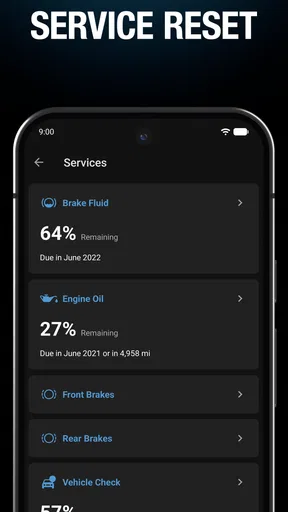
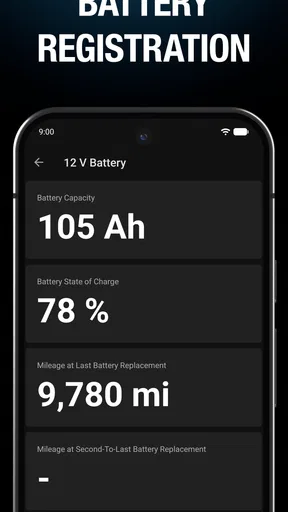
 Analysis by AppCompare
I like the idea behind BimmerLink: it gives BMW and MINI owners a way to look beyond dashboard warnings and get more involved in understanding their cars. In practice, the phone is only one part of the setup. You also need a suitable OBD adapter and a compatible vehicle, so this is best approached as a small diagnostic toolkit rather than an app you install and use in isolation.
That connection shapes the whole experience. When the adapter and car communicate as expected, checking information can feel direct and useful; when pairing or vehicle compatibility gets in the way, the app cannot make the process effortless by itself. I’d choose it if I enjoy learning what a warning means and want access to vehicle information, not if I expect a phone app to replace a mechanic or automatically solve a fault.
What the connection changes in everyday use
The most useful time to open a diagnostic app is often when something has just happened: a warning appears, the car behaves differently, or I want to check a reading before deciding what to do next. With BimmerLink, that moment depends on having the adapter ready and a working connection to the car. It is worth testing the pairing somewhere calm before you actually need it, rather than trying to learn the setup beside a busy road.
For example, imagine a dashboard warning appearing as you arrive home. I would park safely, connect the adapter, open the app and read the stored fault information before deciding whether the car needs prompt professional attention. That can help me describe the issue more clearly at a repair shop. It does not tell me that a warning is harmless, and clearing a code should not be treated as a repair.
The app is free to install, though in-app purchases range from $9.99 to $39.99 per item. I would check what is available for my needs before planning a purchase, and I would factor in the adapter as a separate part of the setup. Its rating averages 4.3 from around 4,800 ratings, which is encouraging, but compatibility and connection quality are more relevant to whether it will work well with a particular car.
Getting Started with BimmerLink
First things first, downloading and installing BimmerLink is a breeze. Available for both Android and iOS, it requires a reliable OBD adapter to connect with your vehicle. Once you’ve got your adapter sorted, fire up the app, and it’ll guide you through a simple setup process. It’s like having a tech-savvy buddy with you every step of the way.
Features That Stand Out
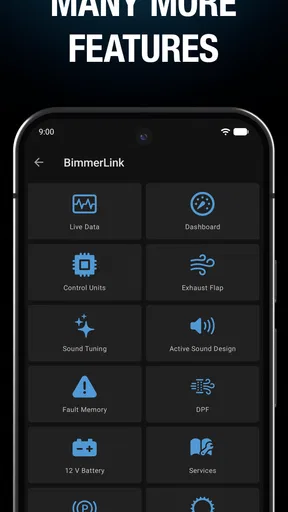
The app is packed with features that make diagnosing your car not only possible but also fun. Here’s a quick rundown:
Worth Reading Before You Choose

EA SPORTS FC Mobile 26 Is a Bigger Football Game, but It Takes Time

Flipboard Shows What News Apps Must Do Beyond the Feed

Switching to Android Auto Means Rethinking Your Driving Routine

Google Calendar Makes a Crowded Week Easier to Manage

Ludo King Makes the Most of the Minutes Between Plans

Baby Panda World Brings Quick Play to Modern Phones, but Its Game Library Feels Busy
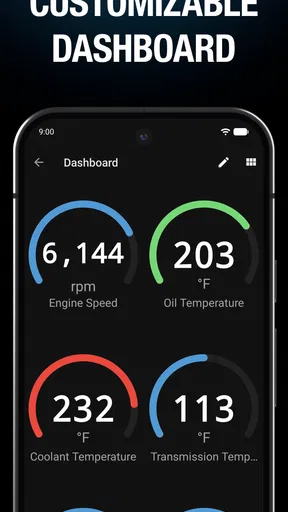
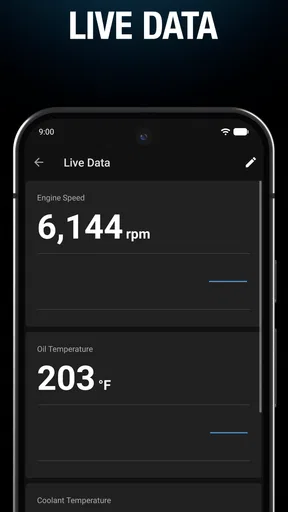
- Real-Time Sensor Data: Ever wondered what’s going on under the hood while you’re driving? BimmerLink provides live data on everything from oil temperature to fuel consumption. It’s like having X-ray vision for your car!
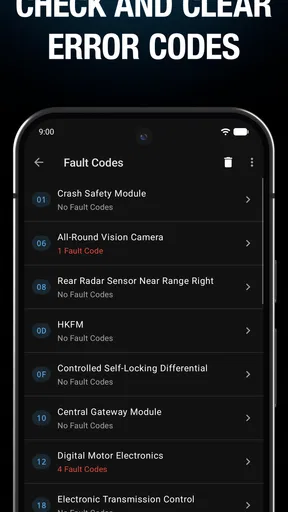
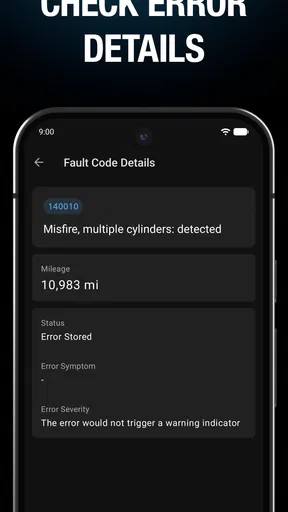
- Error Code Reading & Clearing: Got a pesky warning light on your dashboard? No worries. BimmerLink lets you read and clear error codes, saving you a trip to the mechanic.
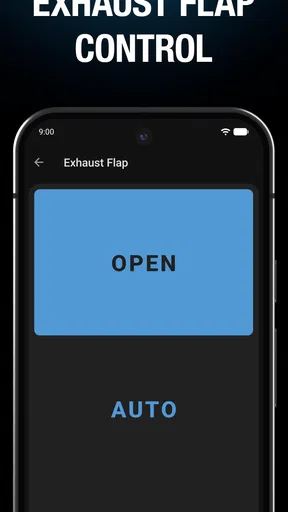
- Exhaust Flap Control: For those who love a bit of performance tuning, you can control the exhaust flap with the app, adjusting the sound to your liking.
- DPF Regeneration: Diesel owners, rejoice! You can monitor and trigger Diesel Particulate Filter (DPF) regeneration, ensuring your car runs smoothly.
Making diagnostics more useful than a code lookup
One practical habit I recommend is to note what the car was doing when a fault appeared: whether the engine was cold, whether the warning arrived after a short trip, and whether you noticed a change in how the vehicle drove. A code is a clue, not a full diagnosis. Keeping that context alongside the reading can make a conversation with a technician more productive than arriving with only a code and a guess.
I would also avoid clearing a warning just to make the dashboard look tidy. If the underlying condition is still present, the alert may return, and removing the code can make it harder to track what happened. Read first, save the details in whatever way suits you, then decide whether a repair professional should inspect it. That cautious workflow is especially worthwhile when the warning affects safe driving.
For DPF-related use, the distinction between monitoring and triggering matters. A regeneration process is not a casual button to press simply because the option exists; I would only consider it when I understand the vehicle’s situation and can follow appropriate guidance. If I am unsure why a warning is present, asking a qualified technician is a better choice than experimenting through the app.
User Experience and Interface
Now, let’s talk about the user interface. BimmerLink is designed with simplicity in mind. The clean, intuitive layout ensures you’re not overwhelmed with information. Navigation is smooth, and all the features are accessible with just a few taps. It’s like having the best of both worlds—powerful tools with a beginner-friendly interface.
Plus, the app supports multiple languages, making it accessible to a global audience. Whether you’re a tech wizard or a newbie, you’ll find BimmerLink easy to use.
Using it in a parked-car routine
I find this kind of tool most sensible as a parked-car companion, not something to operate while driving. If I want to observe live readings, I would set up the connection before moving and have a passenger handle any checks on the road. That keeps attention where it belongs and avoids turning a useful diagnostic screen into a distraction.
A simple routine can reduce friction: keep the adapter with the car, check that the phone and adapter can connect before a planned scan, and leave enough time to read results without rushing. If the connection fails, I would reseat the adapter, check that the car is in the appropriate state for a scan, and try again in a safe place. Repeated failure is a reason to verify the adapter and vehicle fit rather than assuming the fault is in the car.
Compatibility and Connectivity
One of the app’s strongest suits is its wide compatibility range. It supports nearly all BMW and MINI models with an OBD port. As for connectivity, it pairs seamlessly with several OBD adapters, ensuring you’re not limited by hardware choices. Just check their list of recommended adapters, and you’re good to go.
Choosing it over a generic scanner
Compared with a basic universal code reader, BimmerLink is appealing when the car is a BMW or MINI and you want more than a simple fault-code lookup. Its live sensor information and functions such as exhaust-flap control and DPF regeneration make it more tailored to owners who want to explore vehicle-specific information. A generic scanner may be the more sensible option if you work across many makes, only need occasional basic code checks, or already have a reader you trust.
There is a trade-off: a feature-rich app is only useful when the adapter works well with the car and the information is interpreted sensibly. I would treat the app as a window into the vehicle, not as an authority that can confirm every mechanical cause. If the goal is a definitive diagnosis, a workshop has the tools and expertise to investigate beyond what a phone-connected scan can establish.
Who will get the most from it
I would recommend it to a BMW or MINI owner who likes to understand warning messages, check selected live data, or arrive at a service appointment with better questions. It also makes sense for a hands-on owner who is comfortable researching what a reading means and who will use control functions carefully. The app’s developer is SG Software GmbH & Co. KG, and it sits in the auto and vehicles category rather than trying to be a general-purpose car-management tool.
It is less suitable if you drive another make, do not want to buy or manage an OBD adapter, or expect a one-tap fix whenever a dashboard light appears. A driver who only wants reassurance without interpreting diagnostic information may be better served by asking a repair shop to scan the vehicle. The app is rated for Everyone, but that age classification should not be confused with the expertise needed to act on vehicle diagnostics safely.
Practical details before you install
BimmerLink was released on June 7, 2020, and its current version is 2.36.7-6861. It needs Android 6.0 or later on Android devices; iOS is also supported. The app has more than 100,000 installs, but those broad figures cannot predict whether a particular adapter and model combination will be trouble-free. I would check adapter compatibility first, especially if buying hardware specifically for the app.
Another useful question is whether I need it every day. For many owners, the answer is no: it may be something to open when a warning appears, during a planned check, or when monitoring a particular reading. That occasional-use pattern makes setup readiness more important than leaving the app open constantly. Keep expectations grounded, too: a phone display can make information easier to access, but it does not replace maintenance records, a physical inspection, or professional judgment.
Value for Money
Alright, let’s talk about the elephant in the room—cost. While BimmerLink isn’t free, it offers a one-time purchase model, which is a relief compared to subscription-based apps. Considering the breadth of features and the potential savings on maintenance, it’s a worthy investment for any BMW or MINI owner.
My connectivity verdict
For me, the strongest case for BimmerLink is not that it removes the need for a workshop; it helps make the gap between noticing a warning and discussing it with a professional less mysterious. The adapter requirement adds a step, and connectivity is part of the experience rather than an invisible detail. If that setup sounds acceptable and you own a supported BMW or MINI, it can be a useful addition to your car toolkit.
If you want effortless answers, broad multi-brand coverage, or a guaranteed diagnosis from a phone, I would choose a different route. But for a curious owner willing to connect an adapter, read carefully and use the results responsibly, I think it offers a practical way to become better informed about the vehicle.
Final Thoughts
In a nutshell, BimmerLink is a game-changer for those who want to take control of their car’s diagnostics and maintenance. It’s user-friendly, packed with features, and offers excellent value for money. Whether you’re a seasoned car enthusiast or someone just getting started, this app is definitely worth checking out. So, grab your phone, download BimmerLink, and get ready to unlock the full potential of your BMW or MINI!
Pros
- Easy to use with intuitive interface.
- Real-time data monitoring is precise.
- Supports multiple vehicle models.
- Offers comprehensive diagnostic tools.
- Regular updates improve functionality.
Cons
- Requires Bluetooth adapter for use.
- May be expensive for casual users.
- Limited support for older models.
- Some features need in-app purchases.
- Can drain battery if left running.
FAQs for BimmerLink for BMW and MINI
What is BimmerLink and how does it work with BMW and MINI vehicles?
BimmerLink is a comprehensive app designed for BMW and MINI owners, allowing them to monitor and manage various vehicle diagnostics directly from their smartphones. By connecting your phone to the car using a compatible OBD adapter, BimmerLink provides real-time data on engine performance, error codes, and other vital statistics, helping users maintain their vehicles more effectively.
Is BimmerLink compatible with all BMW and MINI models?
BimmerLink is compatible with a wide range of BMW and MINI models. However, it's crucial to check the compatibility list on the app's official website or app store page to ensure your specific model is supported. This step helps avoid potential connectivity issues and ensures you can fully utilize the app's features.
What features does BimmerLink offer to its users?
BimmerLink offers an array of features, including real-time monitoring of engine parameters, reading and clearing of error codes, and battery registration. Additionally, it provides access to advanced diagnostics and the ability to control exhaust flap and sound settings. This makes it a versatile tool for enthusiasts and daily drivers alike, aiming to keep their vehicles in optimal condition.
What are the system requirements and necessary equipment for BimmerLink?
To use BimmerLink, you'll need a compatible smartphone with iOS or Android and a suitable OBD adapter, such as the OBDLink CX or the UniCarScan UCSI-2000. Ensure your device's operating system is up-to-date to avoid compatibility issues. Having the right equipment ensures a seamless connection and the best performance from the app.
Are there any subscription fees or in-app purchases for BimmerLink?
BimmerLink typically requires a one-time purchase fee to download and use the app. There are no ongoing subscription fees, making it a cost-effective tool for long-term use. However, prices may vary depending on the platform, so it’s advisable to check the app store for the most current pricing and any potential updates on additional features.


